
This article will cover the following:
- What is OAuth 2.0
- Step 1 Set Up Ping Delivery Method to Parse Access Token
- Step 2 Set Up Delivery Method with Authorization Header
- Step 3 Make the Offer Ping First
This article will cover the following:
- What is OAuth 2.0
- How to post leads from CAKE to a CRM which requires OAuth 2.0
What is OAuth 2.0
OAuth 2.0 is the industry-standard protocol for authorization. Modern web services will use this protocol to validate web requests are coming from a legitimate source. Typically these systems will require two separate web requests in order to submit the lead, one call to get an access token, and another web request to submit the lead information with the access token collected from the previous web request.
Step 1 Set Up Ping Delivery Method to Parse Access Token
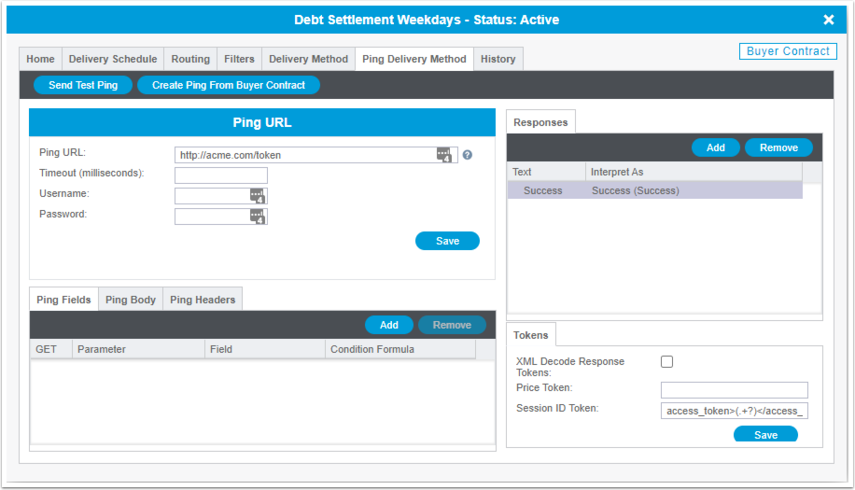
The Access Token is required in order to submit the lead. This endpoint is typically dedicated to receiving access tokens only. Follow the steps below to set up your access token endpoint:
- Navigate to the Buyer Contract Card
- Click on the Delivery Method Tab
- Paste the Ping URL of the Access Token Endpoint
- Click the Save button
- Click Add button in the Response Section
- Add the Text and Interpret As
- Click the Save button
- Click in the Session ID field and Map the Regex statement to match the Access Token
- Click the Save button to save changes
Step 2 Set Up Delivery Method with Authorization Header
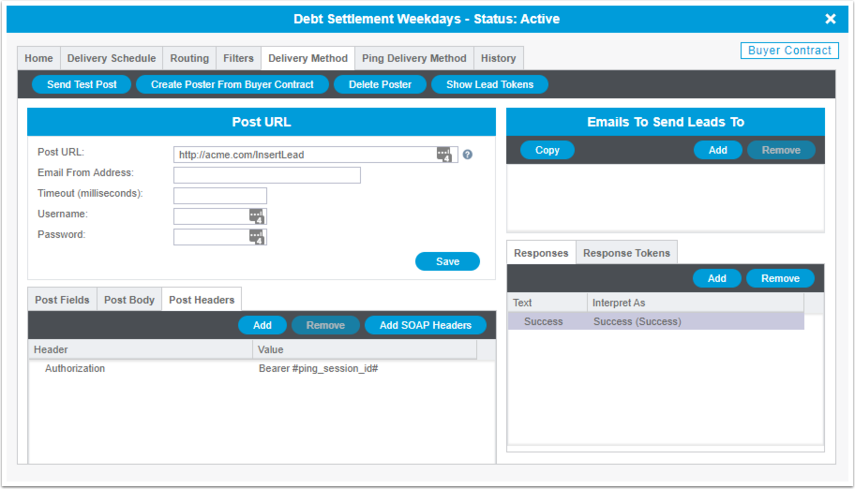
Once you have completed step 1 above, the delivery method will have access to use the #ping_session_id# token as a Post Header. Follow the steps below:
If you have any questions, please reach out to your dedicated CAKE Client Success Manager/Account Manager or contact the CAKE Support Team at support@getCAKE.com.